How hiring software reads your resume — and how to check yours for free
You send out applications and hear nothing back. No rejection, no interview — just silence. It’s easy to assume your experience isn’t good enough. Often that’s not the problem.
Before a single person reads your resume, software does. Most companies run applications through an applicant tracking system, usually shortened to ATS, and the first thing it does is try to pull your resume apart into data: your name, your jobs, your dates, your skills. If that step goes wrong, a recruiter may never see a clean version of what you wrote — or may see a scrambled one. You can have exactly the right background and still get passed over because the software couldn’t read your file.
This is the part nobody tells you about. Here’s how that reading step actually works, the specific things that tend to break it, and a free way to see exactly what the software gets from your resume.
What an ATS actually does to your resume
An applicant tracking system is the software a company uses to collect and sort job applications. When you upload your resume or paste it into an application form, the ATS doesn’t store it as a picture of a nicely formatted page. It tries to parse it — to read the file and turn it into structured fields it can search and filter: name here, email there, this job title with these dates, this list of skills.
That parsing step is where things go wrong. Your resume might look perfect to you on screen. But the software isn’t looking at the layout the way your eyes do. It reads the text in the order the file stores it, follows the rules it was built with, and gives up or guesses when something doesn’t fit those rules. A resume that looks clean to a human can come out of parsing with the contact details missing, the job history in the wrong order, or whole sections turned to nonsense.
Once that happens, two things follow. A recruiter searching the system for, say, “SQL” and “three years” may not find you even though both are on your resume — because the parser filed them somewhere wrong. And when someone does open your application, they may be looking at the parsed version, not your original file. Either way, the reading step decided your fate before anyone judged your experience.
The specific things that break resume parsing
These are the layout choices that most often trip up a parser, and why each one causes trouble.
Multiple columns. A two-column resume — contact and skills down one side, experience down the other — looks organized. But a parser usually reads left to right, top to bottom, across the whole page. So it reads the first line of the left column, then the first line of the right column, then back to the left, and so on. The two columns get interleaved, and your job titles end up spliced together with your skills. The pretty templated resumes people buy are the worst offenders here.
Tables. Resumes often use tables to line things up — dates in one cell, the job title in the next. When the parser flattens a table back into text, the cell boundaries disappear. “Senior Analyst” and “Jan 2023 – Present” that sat neatly side by side can run together or land on different lines with no clear link between them.
Contact details in the header or footer. Putting your name, email, and phone in the page header looks tidy and saves space. But headers and footers are stored separately from the main body of the document, and a lot of parsers skip them. Your contact information — the one thing the system most needs — can simply be dropped.
Text boxes. A text box floats on the page rather than sitting in the normal flow of the text. To you it looks like part of the resume. To the parser it’s often outside the reading order entirely, so whatever you put in it may never be read.
Hidden, white, or tiny text. Some people paste a block of keywords in white-on-white or in a 1-point font, hoping to game the keyword match without a human seeing it. Parsers read that text anyway — they read the file, not the picture — and a lot of systems flag it. It’s more likely to get your application set aside than to help it.
Icons and graphics used as text. Skill bars, star ratings, and little icons used as bullet points aren’t text, so there’s nothing for the parser to read — your skills section can come out empty. It gets worse when a bullet is drawn with a decorative symbol font: the character that renders as a neat dot on screen is often a plain letter underneath, so ”• Led a team” can be read as “n Led a team.”
Titles and dates run together. When a job title and its dates are positioned to sit on the same line without an actual space or separator between them — common when a resume uses tab stops or tight spacing — the text comes out fused: “Senior Widget AnalystMar 2023 – Present.” A parser looking for a clean title and a clean date range sees neither.
Non-standard section headings. Parsers look for the headings they know — “Experience,” “Education,” “Skills.” Get creative with “Where I’ve Made an Impact” or “My Toolkit” and the software may not recognize the section at all, so everything under it gets misfiled or ignored.
None of these mean your resume is bad. They mean it was built for a human eye, and the software reads it differently.
See what the software reads: Readback
The hard part is that you can’t see any of this happening. You send the file and hope. Readback is a free tool that closes that gap: it reads your resume the way hiring software does and shows you the result.
You give it your resume as a PDF or Word file — or paste the text — and it reads the structure the way a parser would, across the five formats people actually use (PDF, DOCX, ODT, RTF, and plain text). It finds the structural problems above, pulls out the fields a parser would try to extract — name, contact details, each role with its dates, education, skills — and shows you what a strict ATS would and wouldn’t read from your file.
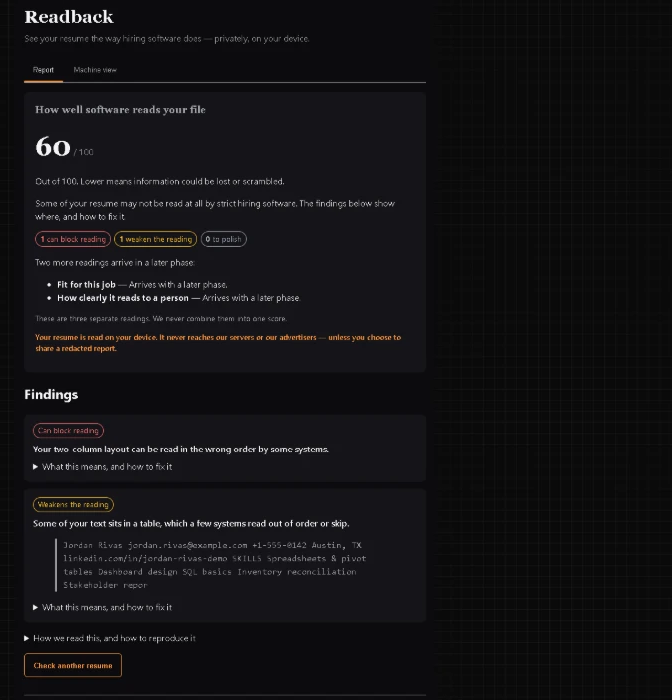
The report above is a real run on a two-column sample resume. It scores 60 out of 100 and flags exactly why: the two-column layout can be read in the wrong order, and a block of text sits in a table that some systems read out of order — you can see the contact details and skills getting run together in the extracted text.
The score, and what it isn’t
Readback gives a machine-readability score out of 100. It’s worth being clear about what that number means, because most resume “scores” online are made up.
This one measures one thing: how readable your file is to software. It is not a judgment of you, your experience, or whether you’ll get the job. A perfectly qualified person can have a low score because their resume is in a layout that parses badly — and that’s useful to know, because it’s fixable. The score starts at 100 and comes down as the tool finds problems, weighted by how much each one actually hurts and how confident it is about it.
It’s also only one of three readings Readback is built around — machine-readability is the one that’s live now; a job-fit reading and a human-readability reading come later. There’s no single invented number that claims to sum up your whole resume, and no “you’re a 73% match” guess. You get the score plus the actual findings, so you can see what’s behind it instead of trusting a number on its own.
The Machine view: line by line
The score tells you there’s a problem. The Machine view shows you exactly where.
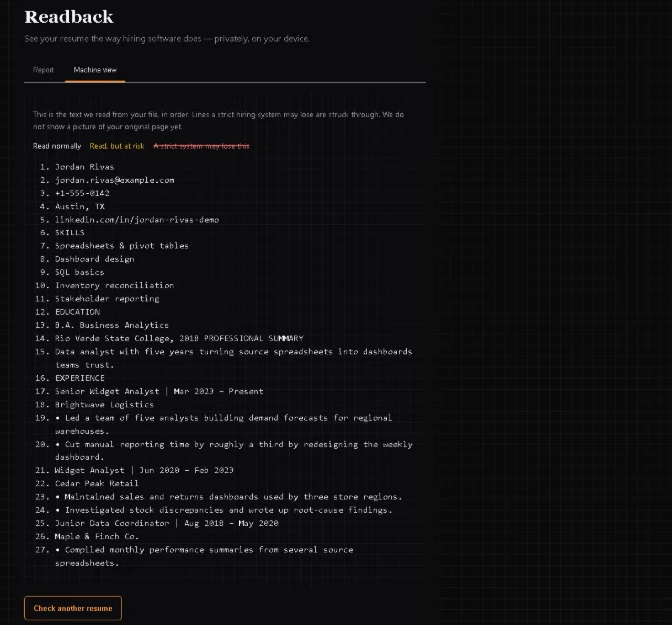
It lays out your resume the way the software read it, line by line, in the order a parser would take them, and marks each line: read normally, read but at risk, or likely to be lost by a strict system. When a two-column layout gets read across, you can watch it happen. In the run above, line 14 reads “Rio Verde State College, 2018 PROFESSIONAL SUMMARY” — the person’s degree runs straight into the heading from the other column, because the parser jumped across the gap. It turns “something’s wrong with my resume” into “line 14 is the problem,” which is the thing you can actually fix.
Your resume never leaves your device
This part matters, and it’s rare, so it’s worth saying plainly: Readback runs entirely in your browser, on your own device. Your resume is never uploaded. It never reaches our servers, because there are no servers it’s sent to. Nobody sees it.

Most resume checkers work the other way: you hand over your resume, it goes to their server, and now a file with your name, address, phone number, and work history is sitting on someone else’s computer, often attached to an account, sometimes used to pitch you services. Readback can’t do that. The reading happens in the page itself. If you don’t believe it, you can check: open your browser’s developer tools, go to the Network tab, and run your resume — you’ll see no requests leave while it works. That’s not a promise we’re asking you to trust; it’s something you can watch.
How to use it
It’s quick:
- Go to the resume checker and upload a PDF or Word file, or paste your resume text.
- Read the report — the score and the list of findings.
- Open the Machine view to see, line by line, what reads cleanly and what gets lost or scrambled.
- Fix the flagged problems — move your contact details into the body, drop the second column, swap icon bullets for real text, give your sections standard headings.
- Re-check, and watch the findings clear.
Who this is for
- Anyone whose applications get no response and can’t work out why.
- Career changers, where getting past the first automated pass matters most.
- Anyone using a designed or templated resume — the two-column, icon-heavy kind that looks great and often parses badly.
- Anyone who wants to confirm their resume survives the software before a human ever sees it.
- Anyone simply curious what hiring software actually pulls out of their file.
What it checks — and what it doesn’t
Being clear about the edges matters more than claiming to do everything.
Readback checks machine-readability: how well hiring software can read and parse your file. That’s it, for now. It does not tell you whether you’ll get the job. It does not match your resume against a specific job posting’s keywords — that’s a separate reading that’s coming, not something it does today. And it does not judge your writing, your phrasing, or your experience. It tells you whether the software can read what you wrote. The rest is up to you.
It’s free, there’s no sign-up, and there’s no account. If you want the full detail of how each check works — every rule, its evidence, and the exact scoring — it’s all laid out on the methodology page, generated straight from the tool itself.
Common questions
Does an ATS really reject resumes automatically?
An ATS doesn’t usually “reject” on its own — it parses your resume into data and lets recruiters search and filter. But if parsing drops or scrambles your information, you can effectively be filtered out without anyone deciding to pass on you. The practical effect is the same: you don’t get seen.
Does a PDF or a Word file parse better?
Either can work, and either can fail — it depends far more on the layout than the format. A clean, single-column PDF usually parses fine. A heavily designed two-column Word file can parse badly. The way to know is to check your actual file rather than follow a blanket rule.
Will a simpler resume really make a difference?
If parsing is what’s holding you back, yes. Moving your contact details into the body, dropping a second column, and using standard section headings can turn a resume the software couldn’t read into one it reads cleanly — without changing a word of your actual experience.
Does Readback upload my resume anywhere?
No. It runs entirely in your browser, on your device. Your resume is never sent anywhere, and you can confirm it by watching your browser’s Network tab while it runs.
Is it really free?
Yes — free, no sign-up, no account.