Tideline — Tech Jobs Radar
See where tech hiring is today: open roles straight from companies’ own careers pages, with the pay employers post.
Try it now— Tools and articles for everyday problems
Modern Niche World is a collection of 223 tools for PDFs, images, video, documents, writing and job hunting. Every tool runs inside your browser, so your files stay on your device: no upload, no signup.
Tideline — Tech Jobs Radar
See where tech hiring is today: open roles straight from companies’ own careers pages, with the pay employers post.
Try it now →Calculators, converters and utilities to make your work and life easier.
Combine PDFs into one file, in the order you choose, without uploading them.
Open tool →Make PDFs smaller by shrinking the photos and scans inside them, with the text left sharp.
Open tool →Shrink photos and images by quality, or to a file size in KB.
Open tool →Put photos and images into one PDF, a page each, at full quality.
Open tool →Count words, characters, sentences and paragraphs as you type or paste.
Open tool →See your resume the way hiring software does. Private, on your device, no sign-up.
Open tool →Split a PDF into single pages or the page ranges you choose.
Open tool →Turn each page of a PDF into a JPG or PNG image, at screen or print resolution.
Open tool →Make images smaller or larger by pixels or percent, keeping their shape.
Open tool →Turn WebP images into JPG files that open almost anywhere.
Open tool →Make a clean QR code for a website, menu, flyer or business card in seconds.
Open tool →Turn a scope of work into a defensible, itemized quote — with complexity, contingency and rush built in.
Open tool →See your effective hourly on a fixed-price gig, the break-even hours, and a clear verdict.
Open tool →Work out exactly what an overdue client owes today, plus a copy-ready reminder line.
Open tool →Reverse-engineer the hourly rate you actually need from your target take-home.
Open tool →How many months can you survive with no income? Get your runway and an honest status read.
Open tool →Ballpark what to set aside for taxes so quarterly bills never blindside you.
Open tool →Plan irregular income against fixed costs and see what's safe to spend.
Open tool →No employer match? Model compound growth on what you set aside yourself.
Open tool →Score a prospect against the warning signs people learn the hard way.
Open tool →Find a meeting time that isn't 3am for someone. Compare everyone's hours at a glance.
Open tool →A distraction-free Pomodoro timer for deep work.
Open tool →Paste a list and get each line once, or compare two lists to see what's only in one.
Open tool →Lay out a lesson with objectives, timed steps and assessment, then print it or copy it as text.
Open tool →Write multiple-choice and true/false questions, take the quiz, see the score and print it.
Open tool →Write a memory hook for each new word, keep them in one library and review them as flip cards.
Open tool →Notes and questions anchored to the moment in a video, PDF or live class, with answers linked and reviewed later. On your device, no account.
Open tool →Plan a trip day by day, with times, places and costs, and print a clean itinerary.
Open tool →Track a trip's spending against its budget in any currency, per day and per traveler.
Open tool →Add your appliances and see what each one costs to run per day, month and year at your electricity price.
Open tool →Combine JPG, PNG, WebP, AVIF, GIF and BMP images into one PDF, a page each, in your order.
Open tool →Get a PDF of photos or scans down to 100 KB or less, for forms with strict upload limits.
Open tool →Get a PDF of photos or scans down to 200 KB or less for an upload form.
Open tool →Bring a PDF with photos or scans under 500 KB without making its text blurry.
Open tool →Bring a PDF with photos or scans under 1 MB for email or an online form.
Open tool →Turn every page, or just the ones you choose, a quarter or half turn.
Open tool →Put a PDF's pages in a new order and delete the ones you don't need.
Open tool →Copy the pages you choose out of a PDF into a new, shorter PDF.
Open tool →Turn each page of a PDF into a sharp PNG image, at the resolution you choose.
Open tool →Stamp a see-through text watermark, such as DRAFT or CONFIDENTIAL, across every page.
Open tool →Number a PDF's pages, in the corner and style you choose, with the cover left out if you like.
Open tool →Turn a PDF’s text into an editable Word document, with headings, paragraphs and lists. Layout simplified.
Open tool →Get the text out of PDFs as .txt files, with the PDF’s line breaks or as whole paragraphs.
Open tool →Turn PDFs into Markdown, with headings, lists and paragraphs found for you.
Open tool →Draw or type your signature and place it on any page of a PDF.
Open tool →Type into a PDF form’s fields, tick its boxes and pick its choices, then save it.
Open tool →Add text and highlights anywhere on a PDF’s pages; its own text stays as it is.
Open tool →Remove the author, title, dates and other hidden details from PDFs, pages untouched.
Open tool →Add a password to your PDF so only people who know it can open it, encrypted with AES-256.
Open tool →Remove the password from your own PDF, using the password you already know.
Open tool →Black out details in a PDF so they’re removed from the file for good, not just covered up.
Open tool →See what changed between two versions of a PDF: every added, removed and changed line.
Open tool →Turn a PDF into a PowerPoint presentation, one slide per page, each page exactly as it looks.
Open tool →Pull the tables out of a PDF as CSV files, ready for your spreadsheet.
Open tool →Read the text in scanned PDFs, page by page, into a text file you can search and copy.
Open tool →Cut a photo down to the part you want: drag a box, pick a shape, or type exact pixels.
Open tool →Turn photos the right way up, or flip them like a mirror, many at once.
Open tool →Make favicon.ico and the other site icons from one image, with the HTML to add.
Open tool →Shrink a photo, signature or scan to 20 KB or less for a form with a tiny upload limit.
Open tool →Bring photos and images under 50 KB for a profile picture or an upload form.
Open tool →Bring photos, screenshots and scans under 100 KB with the best quality that fits.
Open tool →Bring photos and images under 200 KB, usually at full size in pixels.
Open tool →Remove GPS location and camera details from photos without changing the picture.
Open tool →Turn WebP images into PNG files, keeping transparency.
Open tool →Turn AVIF images into JPG files that open almost anywhere.
Open tool →Turn PNG images and screenshots into JPG files.
Open tool →Turn JPG images into PNG files that lose nothing more when edited and saved again.
Open tool →Turn JPG photos into smaller WebP images for websites and apps.
Open tool →Turn PNG images into smaller WebP files, keeping transparency.
Open tool →Turn WebP images into still GIF files for places that only take GIF.
Open tool →Turn AVIF images into PNG files, keeping transparency.
Open tool →Turn .jfif images into .jpg files with no loss: the same picture, renamed.
Open tool →Turn SVG logos, icons and drawings into sharp PNG images at the size you need.
Open tool →Turn SVG files into JPG images on a white background, at the size you need.
Open tool →Turn large BMP bitmaps into small JPG files that open anywhere.
Open tool →Turn BMP bitmaps into smaller PNG files with no loss.
Open tool →Turn large TIFF scans and photos into small JPG files that open anywhere.
Open tool →Turn TIFF images into PNG files with no loss, transparency kept.
Open tool →Turn GIF images into PNG files, transparency kept; animations give their first frame.
Open tool →Turn GIF images into JPG files; animations give their first frame.
Open tool →Turn JPG photos into still GIF images for places that ask for GIF.
Open tool →Turn PNG logos, icons and graphics into still GIF images, clear background kept.
Open tool →Read the printed text in photos, scans and screenshots into a text file with OCR, on your device.
Open tool →Get your resume PDF under a job site’s size limit, with the text kept sharp and readable.
Open tool →Pull the plain text out of your resume PDF, to paste into forms or see what it holds.
Open tool →Paste a job ad and your resume to see the words the ad leans on, and which your resume already uses.
Open tool →Fill in the job and your own two key paragraphs, and get a clear cover letter as Word or text.
Open tool →Pick a career letter, from resignation to an interview thank-you, fill in your details and download it.
Open tool →Turn your role, skills and results into clear LinkedIn headlines, checked against the 220-character limit.
Open tool →Turn any picture into a LinkedIn background photo at exactly 1584 × 396 pixels.
Open tool →Make a QR code for your resume: a link to your portfolio or a contact card that saves your details.
Open tool →Keep every application in one list with its status, dates and notes, saved in your browser, with CSV export.
Open tool →Common interview questions, each with a note on what the interviewer is really asking.
Open tool →Shape an interview story in four parts, Situation, Task, Action, Result, with its length and speaking time.
Open tool →Work out the last day of a notice period, in days, working days, weeks or months.
Open tool →Find the hours when everyone on a remote team is at work, in each person’s local time.
Open tool →Make strong random passwords for your password manager, 8 to 128 characters, with the randomness shown in bits.
Open tool →Join random everyday words into a passphrase you can remember and type, for a computer login or a master password.
Open tool →Get username ideas from friendly everyday words, with a word of your own if you like, sized to a site’s length limit.
Open tool →Make a Code 128, EAN-13 or UPC-A barcode, with the check digit worked out or checked, as SVG or PNG.
Open tool →Make a QR code that lets guests join your Wi-Fi by scanning it, with the password kept on your device.
Open tool →Make placeholder pictures up to 4000 pixels, in your own colors, with the size or your label on them.
Open tool →Make a clean email signature with your name, role and links, ready to paste into Gmail, Outlook or Apple Mail.
Open tool →Type your name and download a handwritten-style signature picture, clear PNG or JPG.
Open tool →Make a clear invoice with line items, a discount and totals to the cent, then print it or download it as a PDF.
Open tool →Make up to 1,000 rows of made-up names, emails, addresses and more for testing, as CSV, JSON or SQL.
Open tool →Check JSON for errors by line and column, then indent, minify or sort it, with every number kept exactly as typed.
Open tool →Turn a JSON array of objects into CSV for a spreadsheet, with nested objects flattened and formula-safe cells.
Open tool →Turn CSV into a JSON array, with the delimiter found for you and numbers, true/false and null detected.
Open tool →Encode text or a file to Base64 and decode it back, with UTF-8, URL-safe and data URL options and the exact spot of any error.
Open tool →Percent-encode or decode text for links and forms, and split a URL into its decoded parts and query parameters.
Open tool →Make random version 4 or time-ordered version 7 UUIDs, up to 500 at once, and check any UUID’s version and time.
Open tool →Work out the MD5, SHA-1, SHA-256, SHA-384 and SHA-512 of text or a file, and check it against a published checksum.
Open tool →Read a JSON Web Token’s header and claims, with expiry times in your local time. It decodes only and never verifies.
Open tool →Test a JavaScript regular expression: every match marked, groups listed and a replace preview, with runaway patterns stopped.
Open tool →Turn Unix time in seconds, milliseconds, microseconds or nanoseconds into dates in any time zone, and back again.
Open tool →Read a cron schedule in clear words, field by field, and see its next 10 run times in your time zone and UTC.
Open tool →Remove comments and extra whitespace from HTML, with pre, textarea, script and style left exactly as written.
Open tool →Shrink a stylesheet by removing comments, extra whitespace and last semicolons, without rewriting any rule.
Open tool →Minify JavaScript with terser in your browser, with errors shown by line and column.
Open tool →Turn a color into HEX, RGB, HSL, HWB, OKLCH and CMYK at once, with the nearest CSS color name.
Open tool →Check a text and background color against WCAG AA and AAA, and get the nearest text color that passes.
Open tool →Convert length, area, volume, mass, temperature, speed, time and data sizes with exact factors, and see the formula used.
Open tool →Work out X% of Y, what percent one number is of another, a percentage change, or the whole from a part, with the working.
Open tool →Add, subtract, multiply and divide fractions and mixed numbers with every step shown, and turn decimals into fractions.
Open tool →Turn a width and height into a ratio like 16:9, and work out a missing side in whole pixels for the ratio you keep.
Open tool →Work out powers, roots, logs, factorials and trigonometry in degrees or radians, typed or tapped, with clear errors.
Open tool →Count the years, months and days between two dates, or add and subtract days, weeks, months and years from a date.
Open tool →Work out an exact age on any date in years, months and days, with the weekday of birth and the next birthday.
Open tool →Count the working days between two dates, with your own weekend days and holidays left out.
Open tool →See the time now in several cities at once, with each place’s UTC offset, daylight saving time and next clock change.
Open tool →Work out a semester and cumulative GPA from credits and letter grades, with optional honors and AP weighting.
Open tool →Time your typing on short everyday passages and see your words per minute and accuracy, with mistakes marked as you go.
Open tool →Look up A4, Letter and every ISO and ANSI size in mm, inches or points, with pixels at any DPI and a closest-size finder.
Open tool →Keep a to-do list in your browser with due dates and your own order, and tick tasks off as you go.
Open tool →Write plain-text notes that save as you type, up to 20, with word counts and a .txt download.
Open tool →Count down from up to 99:59:59 with quick presets, pause and +1 minute, and get a beep and a clear message when time is up.
Open tool →Time anything to the hundredth of a second, with up to 999 laps, the fastest and slowest marked, and laps to copy or save as CSV.
Open tool →Spin a wheel of 2 to 100 entries, every slice the same size and the chance shown, and take results off as you go.
Open tool →Flip up to 100 coins or roll up to 20 dice, d4 to d100 or up to 1,000 sides, with every result, the total and a tally.
Open tool →Score options on what matters to you, weighted by importance, and see the totals ranked with the working, or weigh pros and cons.
Open tool →Press each key to see it light up and get marked tested, with its key, code and location, and the most keys held at once.
Open tool →Hide faces, license plates, names and addresses in a photo or screenshot under boxes you draw: pixelated, blurred or solid black.
Open tool →Turn JPEG XL (.jxl) images into JPG files that open anywhere.
Open tool →Turn JPEG XL (.jxl) images into PNG files, transparency kept.
Open tool →Turn JPG photos into JPEG XL (.jxl) images at the quality you choose.
Open tool →Turn PNG images into lossless JPEG XL (.jxl) files, keeping transparency.
Open tool →Trim the margins of every page, or just the pages you choose, with a preview of what's kept.
Open tool →Turn a color PDF black and white, with its text kept as text you can select and search.
Open tool →Fit every page to A4 or US Letter, centered and never stretched, with text still sharp.
Open tool →Check page sizes, fonts and picture resolution before printing, and flatten forms and comments.
Open tool →Arrange the pages to print on both sides and fold into a booklet, two pages a side.
Open tool →Put 2 to 12 photos in one grid picture with a gap, a border and a background color, as JPG or PNG.
Open tool →Add bold top and bottom text to a photo of your own, sized to fit, and download it as JPG or PNG.
Open tool →Pick out a picture’s 3 to 12 main colors with HEX, RGB, HSL and each one’s share, as CSS, JSON or swatches.
Open tool →Turn 2 to 50 pictures into an animated GIF with your own order, delays and looping.
Open tool →Trace a logo, icon or drawing into an SVG, in black and white or up to 16 colors, on your device.
Open tool →Pick names at random from a list of up to 2,000, take picked names out of the draw, or split everyone into fair groups.
Open tool →Print a month or a whole year from 1600 to 2400, with weeks from Sunday or Monday and optional ISO week numbers.
Open tool →Put iPhone and camera MOV videos into MP4, copied as they are whenever they can be, so nothing is lost.
Open tool →Turn WebM screen recordings into MP4 files with H.264 video and AAC sound, for the players and sites that expect them.
Open tool →Save the sound from a video as an M4A or WAV file, copied as it is when it's already AAC.
Open tool →Make a video file smaller with a quality level and picture size you choose, and compare the sizes before you download.
Open tool →Cut a video to the part you want, with sliders and pictures of the start and end, usually without re-encoding.
Open tool →Turn up to 15 seconds of a video into an animated GIF, with your own frame rate, width and looping.
Open tool →Convert MP3, M4A, WAV, OGG and FLAC sound files to M4A, WAV or OGG at the bitrate you choose.
Open tool →Cut a sound file to the part you want on its waveform, copied without re-encoding so nothing is lost.
Open tool →Remove the sound from a video, with the picture copied exactly as it is.
Open tool →Turn a sideways or upside-down video the right way up, without re-encoding for MP4 and MOV.
Open tool →Join up to 10 video clips into one, in the order you choose, copied without re-encoding when they match.
Open tool →Crop a video's picture to the part you want with a box you drag, a shape such as square or 9:16, or exact pixels.
Open tool →Save pictures from a video as JPG files, a set number spread evenly or one every few seconds, up to 100 at a time.
Open tool →Speed up or slow down a video from 0.25× to 4×, with the picture copied and voices kept at their own pitch.
Open tool →Make sound files and videos louder, or bring them to one loudness in LUFS, without clipping.
Open tool →Put a voiceover or your own music onto a video in place of its sound, with the picture copied as it is.
Open tool →Join up to 20 sound files into one, in the order you choose, copied without re-encoding when they match.
Open tool →Record your voice from the microphone and save it as M4A, WAV or OGG. It records only when you press Record.
Open tool →Turn one sheet or every sheet of an XLSX, XLSM, XLS, XLSB or ODS workbook into CSV, with values as shown or raw.
Open tool →Turn CSV into an .xlsx workbook with numbers detected, leading zeros kept and formula-like text stored as text.
Open tool →Turn a sheet of an XLSX, XLSM, XLS, XLSB or ODS workbook into JSON objects keyed by its header row, or into arrays.
Open tool →Turn a JSON array of objects into an .xlsx workbook, with nested keys as columns and numbers kept as numbers.
Open tool →Get the plain text out of a Word .docx file, with a blank line or a single break between paragraphs, and word and character counts.
Open tool →Turn a Word .docx into clean HTML with headings, lists, links and tables, images optional, checked in a safe preview.
Open tool →Convert Markdown to clean HTML as you type, with tables, strikethrough and a live preview, as a fragment or a full page.
Open tool →Turn pasted HTML or an .html file into clean Markdown, with your choice of heading, bullet, code block and link styles.
Open tool →Convert XML to JSON with attributes as @name, repeated elements as arrays and errors shown by line and column.
Open tool →Convert YAML to JSON with the YAML 1.2 core schema, several documents, anchors and aliases, and exact numbers.
Open tool →Turn JSON into YAML 1.2 with 2 or 4 spaces, quotes only where needed, keys in order or sorted, and exact numbers.
Open tool →Change text to UPPERCASE, lowercase, Sentence case or Title Case, or turn lines into camelCase and snake_case names.
Open tool →Put a list in order A to Z, in natural order or by length, or reverse or shuffle it, keeping every line.
Open tool →Remove extra spaces, empty lines, curly quotes and invisible characters from pasted text, with a count of each fix.
Open tool →Make lorem ipsum placeholder text by paragraphs, sentences or words, as plain text or HTML paragraphs.
Open tool →Compare two versions of a text line by line, with the changed words marked and a .diff file to download.
Open tool →Find and replace text as typed or with a regular expression, with match case, whole words and every match marked first.
Open tool →See the words and two- and three-word phrases a text uses most, with counts, shares and a CSV download.
Open tool →Translate text to International Morse code and back, and play it as sound at the speed you choose.
Open tool →Split a long text into numbered posts that each fit a character limit you set, cut at sentence ends.
Open tool →Turn your own words and phrases into tidy hashtags, each word capitalized, with repeats left out.
Open tool →Tidy chapter times and titles for a video description and check them against the chapter rules.
Open tool →See your own words in eight plain bio templates, each counted against the character limit you set.
Open tool →Make a 1280 × 720 or 3840 × 2160 video thumbnail from your own picture or a plain color, with a bold title.
Open tool →Write a page’s title, description, canonical and robots tags, with optional Open Graph and X card tags, escaped and ready to paste.
Open tool →See how a shared link could look in two generic preview cards, from typed details or pasted meta tags and your own picture.
Open tool →Add utm_source, utm_medium and utm_campaign tags to one link or a list, encoded correctly, with the link’s own parameters kept.
Open tool →Turn titles into clean, lowercase URL slugs with accents removed and hyphens or underscores, one per line for a list.
Open tool →Check language and region codes for each version of a page, then get hreflang link tags, an XML sitemap or Link headers.
Open tool →Build a robots.txt file from User-agent groups, Allow and Disallow rules and Sitemap lines, with every name and path checked.
Open tool →Paste a robots.txt file to see whether a crawler may fetch an address and which rule decides, matched as RFC 9309 says.
Open tool →Turn a list of page addresses into an XML sitemap, with repeats and other hosts left out and an index past 50,000.
Open tool →Write JSON-LD structured data for articles, FAQs, local businesses, products, breadcrumbs, events and people from a form.
Open tool →Pack up to 50 files into one ZIP on your device, compressed or stored as they are, with clashing names numbered.
Open tool →Open a ZIP on your device, see every file inside with its size and date, and save the ones you need.
Open tool →Check downloaded files against a published checksum list or one hash, with MD5, SHA-1, SHA-256, SHA-384 or SHA-512.
Open tool →See what a file really is from its first bytes, the extension it should have, and whether its name is wrong.
Open tool →Rename up to 200 files at once with a pattern, numbers, a date, find and replace or a change of case.
Open tool →Paste one post and see its count against each site’s limit, worked out from that site’s own counting rules.
Open tool →Swap the letters of a name or heading for bold, italic, sans-serif or monospace math symbols, or turn styled letters back to plain.
Open tool →Reverse a whole text, the letters of each word or the order of the words on each line, with emoji and accents kept whole.
Open tool →See how a page title, address and description might look as a generic search result at desktop and phone widths.
Open tool →Number each line with your own start, step, separator and padding, skipping empty lines if you like, or take the numbers off again.
Open tool → Job search
 Before a person reads your resume, software does — and it often garbles it. Here's how applicant tracking systems parse resumes, what breaks, and a free tool that shows you exactly what they read.
· 10 min read
Practical articles on cloud, careers and consumer tech.
 Tech & Gadgets
 Everything about Microduck, Hugging Face and Pollen Robotics' $399 open-source robot duck — specs, pricing, how to train it, and who it's for.
· 17 min read
 AI tools
 What two weeks of high-stakes operational work with Gemini 4 Argon taught me about using AI models where a single mistake has real consequences — and how to get real leverage from them anyway.
· 10 min read
 Cloud
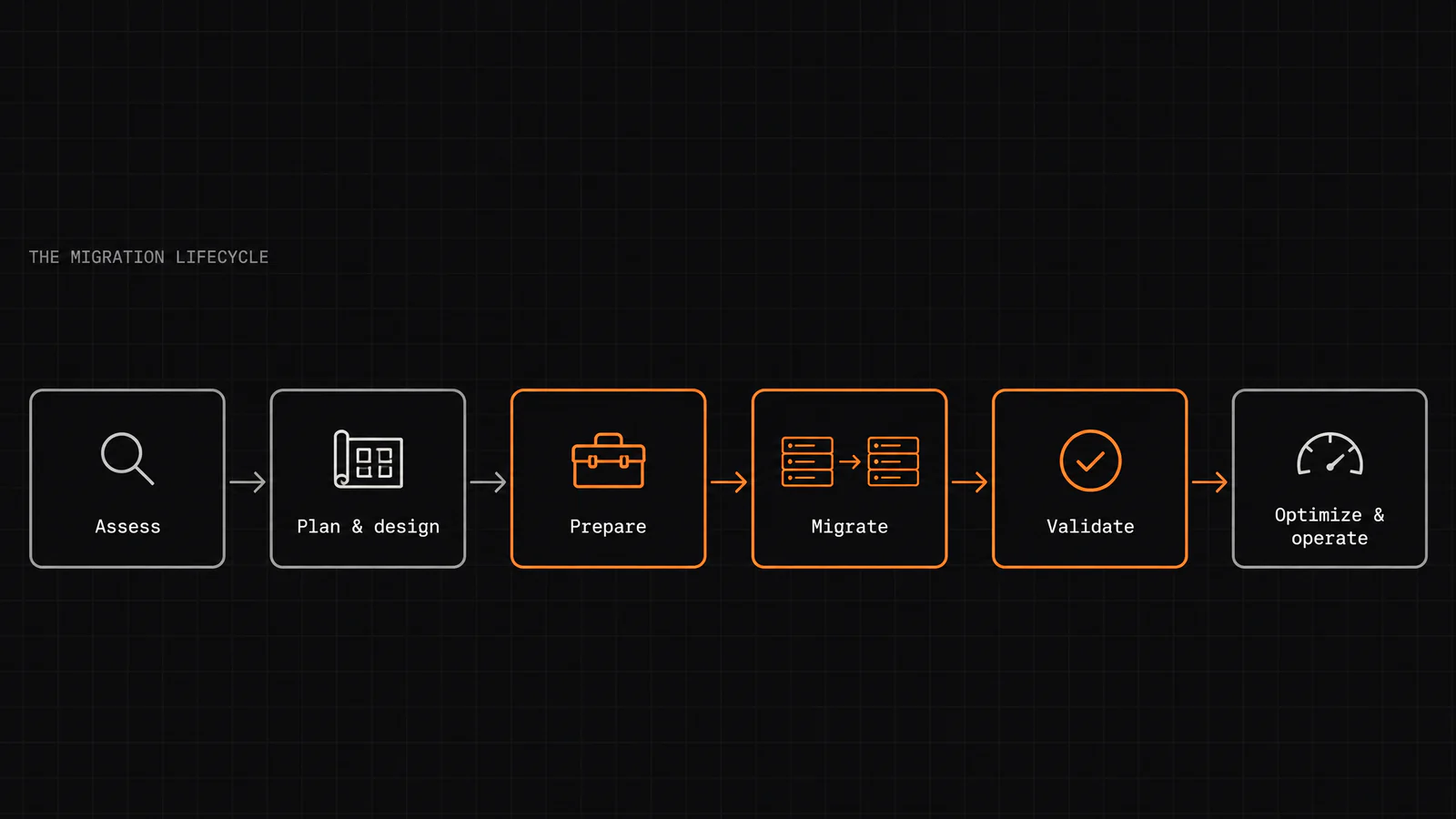
Cloud The six migration phases as one cloud migration framework: what each phase does, how AWS, Azure and Google map onto it, the 7 Rs, and a checklist.
· 25 min read
 Tech & Gadgets
 Tesla's next-generation Roadster is finally here. What it is, the three versions, how its fan suction and cold-gas thrusters work, what is still unknown, and why it matters for the cars the rest of us drive.
· 8 min read
 Tech & Gadgets
 A clear guide to the Insta360 Luna Ultra: what it does, its two-lens Leica camera, real-life uses, how it compares to the DJI Osmo Pocket 4P, and who should skip it.
· 9 min read
 Cloud
Cloud The honest comparison of the big three cloud providers — not which is 'best,' but which fits your workloads, your existing stack, and your team. Real strengths, how pricing really compares, and why there's no universal winner.
· 6 min read
Searches the site's blog and tools.
We use cookies for analytics and, when ads are shown, for advertising. Cookie policy · How Google uses data.