The Complete Guide to Migration Phases
A migration is one of the few IT projects where doing the work carefully is cheaper than doing it fast. The numbers make the case plainly. McKinsey’s 2021 survey of nearly 450 CIOs and IT leaders found that migration missteps cost the average company 14% more than planned each year, and that 38% of companies saw their migrations slip by more than a quarter. Flexera’s 2026 survey (a vendor survey) puts wasted cloud spend at roughly 29%, by its respondents’ own estimate. None of that comes from the cloud being hard to buy. It comes from skipping or rushing a phase.
“Migration phases” is the structured sequence a team moves through to relocate workloads, data, or an entire application estate from one environment to another — and get them running well on the other side. The word covers more ground than people expect. Moving virtual machines to AWS, replicating a database across regions, lifting an on-premises app into Azure, consolidating two companies’ data after a merger: these look like different projects, but they share one lifecycle. Assess what you have. Plan how each piece moves. Prepare the destination. Move it. Prove it works. Then tune what you landed.
This guide treats migration as a single discipline with specialized dialects. It walks the universal lifecycle first, maps the major vendor frameworks (AWS, Azure, Google) onto it so the differing phase counts stop being confusing, then goes deep on each phase — including the parts teams reliably underinvest in, like rollback design and validation. It closes with the failure patterns mapped to the phase that seeds them, and a checklist you can run against your own project. Whether you are moving ten servers or ten thousand, the shape is the same.
The universal migration lifecycle
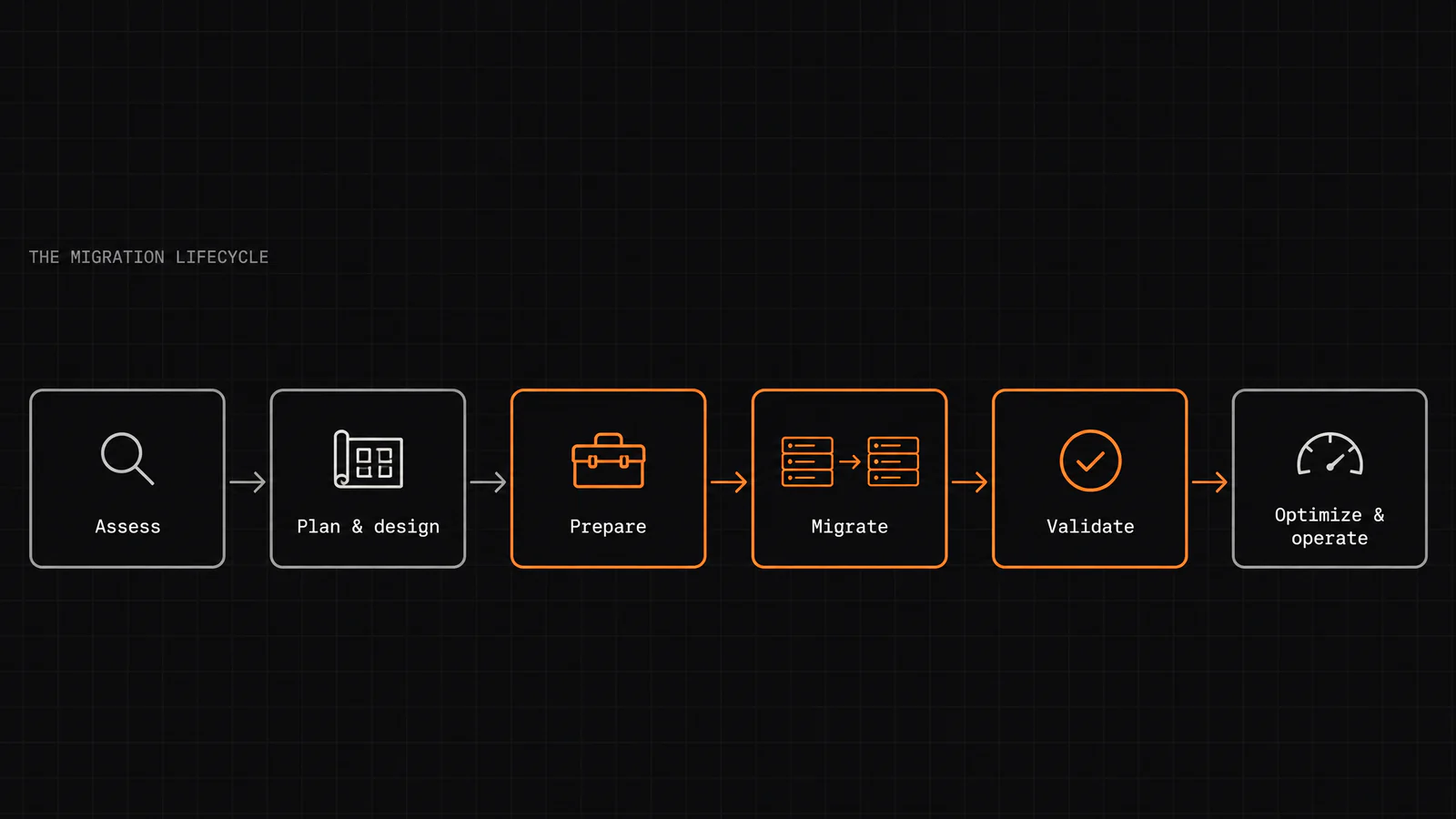
Strip away the vendor branding and every migration runs through the same six phases, in order. Each one produces something the next one needs; skip ahead and you pay for it later, usually at the worst possible moment.
- Assess. Find out what you actually have, not what the documentation claims. Inventory every server, application, database, and data store. Map the dependencies between them — the undocumented ones are what break cutovers. Build the business case: current cost, projected cost, and the measurable reason you are doing this at all.
- Plan and design. Decide how each workload moves (the 6 Rs, covered below), group workloads into waves, and design the destination — the network, identity, and security foundation your workloads will land on. This is also where you design the things nobody enjoys designing: the cutover sequence and the rollback path.
- Prepare. Build the landing zone. Clean the data before it moves, not after. Provision target environments, set up the migration tooling, and run a pilot — a small, low-risk wave that proves your runbooks work before a critical system is on the line.
- Migrate (execute). Move the workloads and data, wave by wave, following the tested procedure. Keep the source live until the destination is proven. This is the phase everyone pictures when they hear “migration,” and it is rarely where projects actually fail.
- Validate. Prove the migrated system matches the source — record counts, data integrity, application behavior, performance against the pre-migration baseline. Validation has an explicit go/no-go decision and a rollback trigger. A migration is not finished when data arrives; it is finished when you have proven it arrived intact.
- Optimize and operate. Right-size what you over-provisioned, close the security gaps, put cost governance in place, and decommission the source once you are confident. For many estates, modernization — re-architecting for cloud-native benefits — begins here, after the move, not during it.
The discipline is in the order. Assessment feeds planning; planning feeds preparation; validation gates the cutover; optimization recovers the value. Phases three through five are where careful teams separate from lucky ones.
How the major frameworks map onto it
The reason “how many phases are there?” gets a different answer everywhere is that each vendor draws the boundaries where its tooling and funding model sit. The underlying lifecycle does not change. The table below lines the big three up against the universal phases so you can read any of them without relearning the concept.
| Universal phase | AWS (Migration Acceleration Program) | Microsoft Azure (Cloud Adoption Framework) | Google Cloud |
|---|---|---|---|
| Assess | Assess — build the business case, run a Migration Readiness Assessment against the six CAF perspectives | Strategy + Plan | Assess |
| Plan & design | part of Mobilize | Ready (landing zone) | Plan |
| Prepare | Mobilize — discovery, landing zone, pilot across eight workstreams | Ready | Plan / Deploy prep |
| Migrate | Migrate & Modernize (initialize, then implement) | Adopt — Migrate | Deploy |
| Validate | within Migrate & Modernize | Adopt — Migrate | Deploy |
| Optimize & operate | — (no named MAP phase) | Govern + Secure + Manage | Optimize |
A few things are worth noting. AWS compresses the whole front end into just three named phases — Assess, Mobilize, and Migrate & Modernize — because its Mobilize phase bundles planning and preparation into one funded push across eight workstreams, including building the landing zone. Its own guidance is explicit that assess and mobilize are the foundation, and that you generally migrate first and modernize second rather than trying to do both at once.
Azure’s Cloud Adoption Framework spreads the same work across more named stages — Strategy, Plan, Ready, Adopt, Govern, Secure, Manage — and treats governance, security and management as continuous rather than as a final phase. Google’s Assess / Plan / Deploy / Optimize is the cleanest four-word version of the lifecycle.
The practical takeaway: a “four-phase” guide and a “six-phase” guide are not describing different processes. One has merged assess-and-plan, or folded validation into execution. When you read a framework, find where it put the work — not how many boxes it drew.
The 6 Rs (and 7th): choosing a strategy per workload
Inside the planning phase sits the single most consequential decision of the whole project, and it is not a project-level decision — it is made once per workload. The framework for it is the 6 Rs, originally five from Gartner in 2011, extended by AWS. A seventh, Relocate, is now common. Each R is a different answer to “how should this particular thing move?”, and the right migration mixes several across the estate.
They are best understood as a spectrum from least to most effort, where effort buys cloud-native benefit:
| Strategy | What it means | Effort | When it fits |
|---|---|---|---|
| Retire | Turn it off — you discovered it is unused | Lowest | Redundant or dead apps found during assessment |
| Retain | Leave it where it is, for now | Low | Regulatory, latency, or dependency reasons block the move |
| Relocate | Move at the hypervisor level, no OS/app change (e.g. VMware to cloud) | Low | Whole-estate lift with an existing virtualization platform |
| Rehost | “Lift and shift” — copy the workload as-is | Low–Medium | Speed matters; you will modernize later |
| Repurchase | Drop the old app, move to a SaaS equivalent | Medium | A good off-the-shelf product already exists |
| Replatform | “Lift, tinker, and shift” — small cloud optimizations | Medium | A quick win is available without re-architecting |
| Refactor | Re-architect for cloud-native (containers, serverless, managed data) | Highest | The app is strategic and its current architecture blocks scale |
The honest guidance that experienced teams converge on: most applications are rehost or replatform, and refactor is reserved for the strategic few. Refactoring a stable application just because cloud-native is fashionable is how budgets evaporate. Refactor when the payoff — real elasticity, agility, or cost-at-scale — is named and large enough to justify the work.
A common and effective sequencing trick: use the easy rehost and replatform waves early to build organizational muscle — your runbooks, your landing zone, your team’s confidence — and save the hard refactors for once that muscle exists. This is also why AWS advises migrating first and modernizing afterward. Trying to re-architect mid-move combines the risk of both at once.
Phase deep-dive 1 — Assess
The assessment phase answers three questions: what do we have, what does it cost, and what depends on what. Teams that cut this phase short are the ones improvising under pressure three months later.
Discovery and inventory. You cannot migrate what you cannot see. Automated discovery tools — AWS Transform (which replaced AWS Application Discovery Service for new customers), Azure Migrate, Google Cloud Migration Center — crawl your environment and build an inventory of servers, applications, and their resource usage. This almost always surfaces things nobody knew were running, and occasionally things nobody can explain. That is the point.
Dependency mapping. This is the part that saves cutovers. Applications talk to databases, databases feed reports, services call other services, and a surprising amount of it is undocumented. Mapping these dependencies determines your wave grouping: things that talk to each other frequently usually need to move together, or you introduce latency and failure across a network boundary. The failure statistics bear this out — Flexera’s 2026 survey found understanding application dependencies the top migration challenge, cited by 54%.
The business case and TCO. The assessment is also where you prove the move is worth making. That means an honest total cost of ownership comparison: current infrastructure cost versus projected cloud cost, including the costs people forget — data egress fees, dual-running both environments during the transition, and the engineering time the migration itself consumes. One of the most common budget failures is simply not accounting for egress fees and the cost of running two environments in parallel during cutover.
Readiness. AWS frames its assessment around the six perspectives of its Cloud Adoption Framework — business, people, governance, platform, security, and operations — and the people and governance perspectives matter as much as the technical ones. McKinsey found that companies that migrated on schedule were 57% more likely to hire for advanced skills such as DevOps and FinOps. Assessing whether your team and your governance are ready is as real as assessing whether your servers are.
Deliverables that should exist when assessment ends: a full inventory, a dependency map, a prioritized wave plan, a risk register, and a TCO model with a defensible business case. If you cannot produce those, you are not ready to plan.
Phase deep-dive 2 — Plan & Design
Planning converts the assessment into a sequence and a destination. Four pieces of design work happen here, and two of them are the ones teams skip.
Wave planning. You do not move everything at once. Workloads are grouped into waves based on dependency clusters and business criticality, and the waves are ordered so that early ones are low-risk. The first wave is a pilot: a small, non-critical group that proves your tooling, runbooks, and team before anything important is at stake. Each wave gets its own plan — a migration is a series of small migrations, not one big leap.
The landing zone. This is the foundation your workloads land on: the network topology, identity and access management, security guardrails, logging, and account structure, built to scale as you add workloads. Getting it right early is what lets later waves move fast; getting it wrong means re-doing security and networking under every workload you have already moved.
Cutover strategy. For each workload you decide how the actual switch happens — the cutover window, how data stays synchronized up to the moment of switch, and what “done” looks like. The three broad approaches (big-bang, phased/trickle, parallel-run) are covered in the execute section; the decision about which to use is made here, driven by how much downtime the workload can tolerate.
Rollback design — the step most teams underinvest in. A cutover is only safe if it is reversible. Before any production move, you define the rollback path: what triggers it, who has the authority to call it, and how you get back to the prior state without losing data. Microsoft’s migration guidance is plain: set rollback criteria and procedures before any migration starts. Without them, a recoverable problem becomes an outage. The discipline is blunt: a near-zero-downtime cutover is earned in the design, not improvised at the cutover. Define rollback before promotion, not after something breaks.
Security and compliance are designed in here too, not bolted on later. Security and compliance gaps are a common source of migration trouble, and the EU Data Act — applicable since September 2025 — adds cloud-switching obligations that have to be planned for, not discovered at audit.
Phase deep-dive 3 — Migrate & Execute
Execution is the move itself. The central choice is how you cut over, and it comes down to a single trade-off: how much downtime the workload can tolerate versus how much complexity you are willing to run to avoid it. There are three broad approaches.
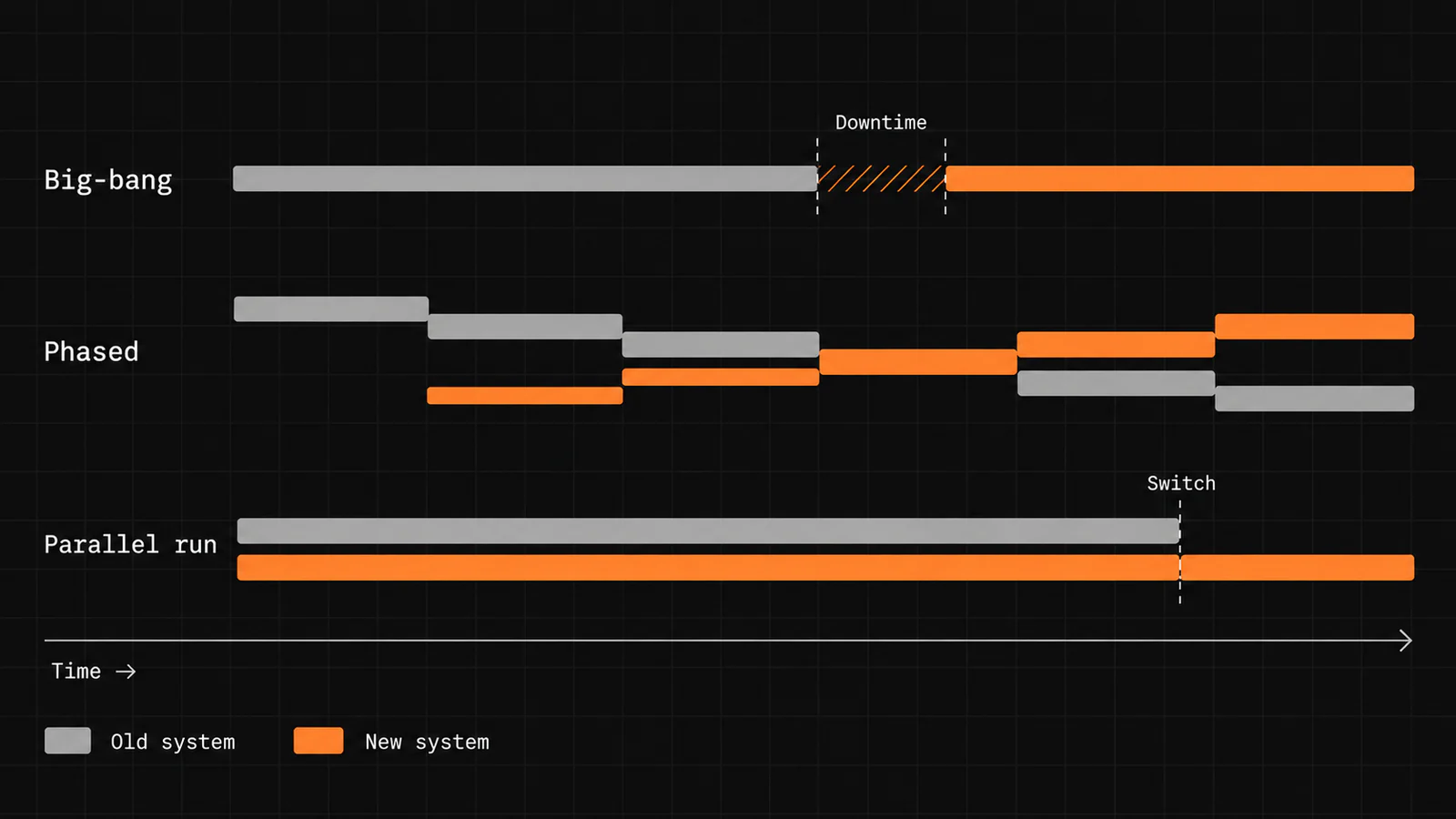
Big-bang cutover. You move everything in one planned window — typically a weekend — take the source down, move the data, validate, and bring the destination up. It is the simplest to reason about and the cheapest to run, but the risk is concentrated: if validation fails late on Sunday, you are either fixing it live or invoking rollback, and every user feels the outage. Best fit: smaller, well-understood datasets that can tolerate a defined downtime window.
Phased / trickle migration. You move data and workloads in batches over days or weeks while both the old and new systems stay live. Risk is spread out and each batch is recoverable, but you are running two systems in parallel and keeping them consistent, which is operationally heavier. Best fit: large estates where a single downtime window is not acceptable.
Parallel run. Both systems run fully live, in sync, until you are confident enough to switch authority to the new one. It carries the lowest cutover risk and the highest running cost, since you maintain a complete synchronized copy. Best fit: high-stakes or regulated data where a bad cutover is unacceptable.
Keeping data in sync — CDC. For anything approaching zero downtime, the workhorse is change data capture (CDC). You take a consistent snapshot of the source, load it into the destination, then stream the ongoing changes — the “trickle” of inserts and updates — until the two are caught up. The managed migration services (AWS DMS, Azure Database Migration Service, Google Cloud DMS) do this in their online modes: full load, then continuous replication until cutover. When the destination has caught up and lag is near zero, you perform a short, controlled switch of write authority.
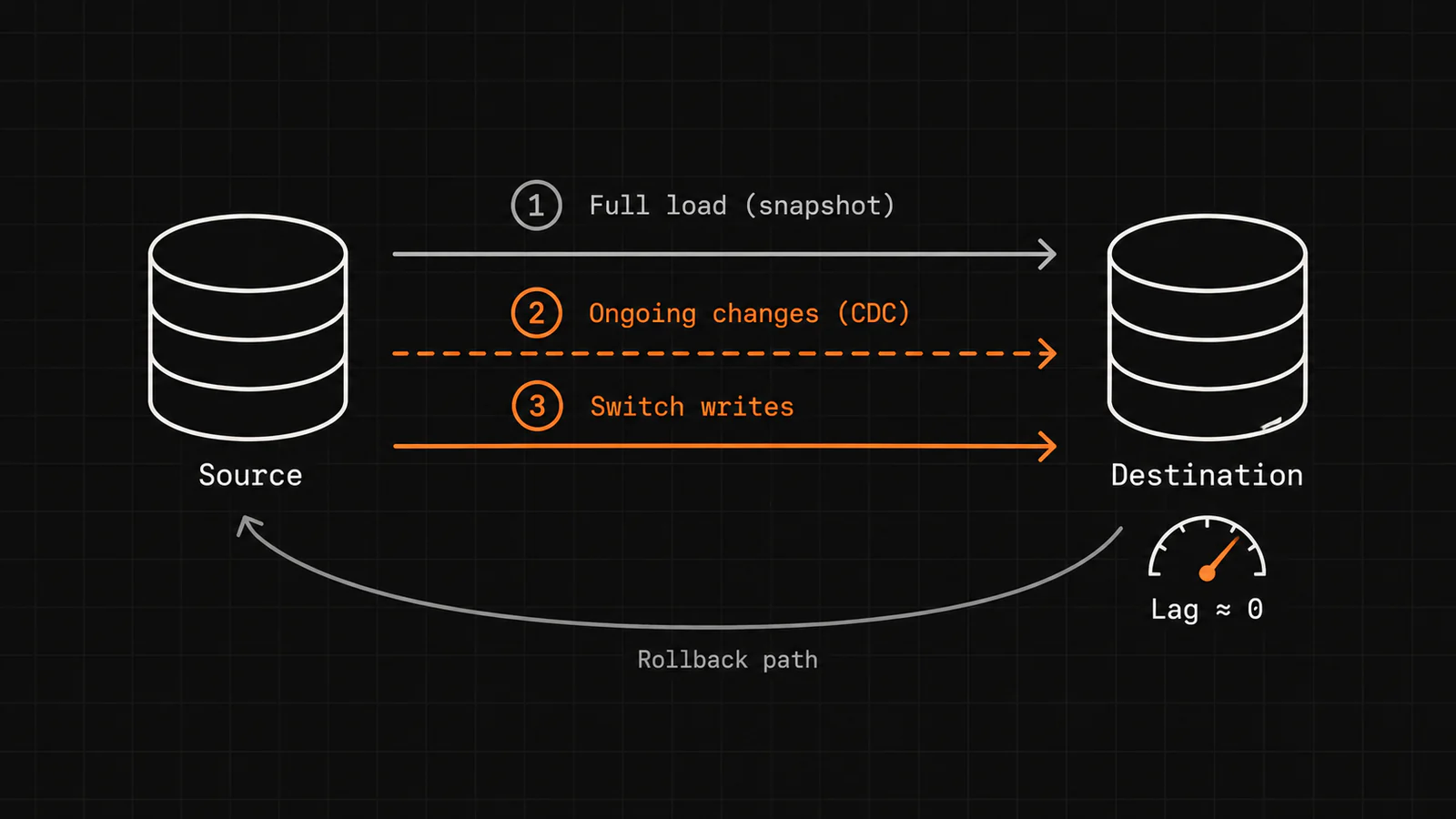
A note on “zero downtime.” Honest practitioners call it near-zero downtime, because a strictly zero-downtime database move is an unsafe promise for many workloads. The realistic goal is a short, rehearsed, reversible cutover — a brief controlled handoff of write authority after CDC has the destination in sync, with a rollback path ready. Keep a single authoritative writer until promotion. Rehearse the cutover at least once on production-shaped data, and rehearse an aborted cutover too, so the rollback is not its first run when it matters.
Phase deep-dive 4 — Validate
Validation is the phase that defines whether a migration succeeded, and it is the one most likely to be treated as a formality. The rule worth internalizing: a migration is finished only when you have proven the new data matches the old. Arrival is not proof.
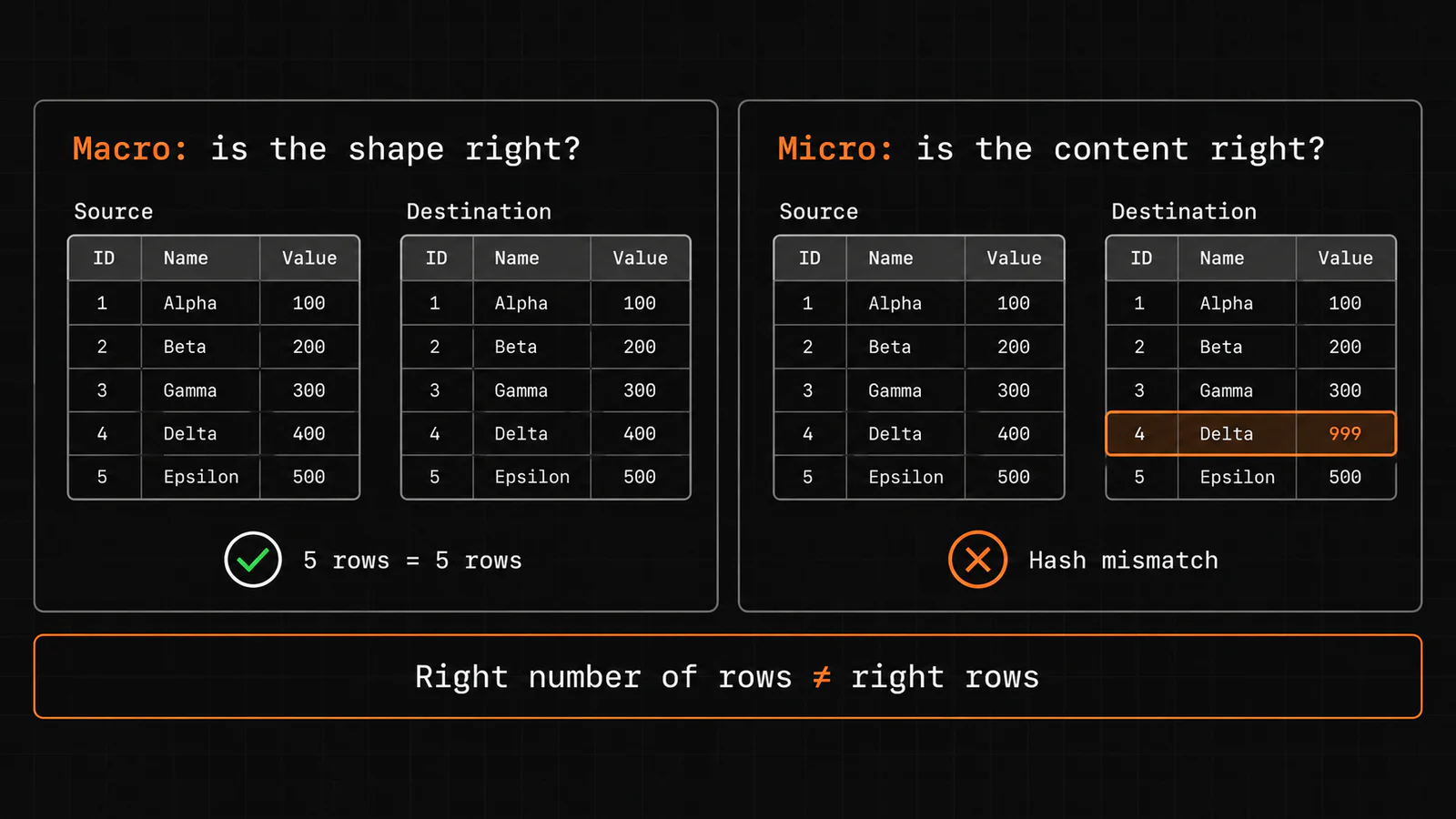
Good validation works at two levels at once.
- Macro validation confirms the shape is right: row counts match, table counts match, totals reconcile, nothing was dropped or duplicated in transit. Data integrity problems — corruption, duplication, failed transfers — are what macro checks are designed to catch.
- Micro validation confirms the content is right: a per-record content hash or field-level comparison on a sample, because counting rows proves nothing about whether the rows are correct. A table can have the right number of wrong records.
Beyond the data itself, you validate that the application behaves correctly against the migrated data, and that performance meets the baseline you captured during assessment. A system that returns correct data twice as slowly has not passed.
The go/no-go decision. Validation is not passive checking — it is a gate with an explicit decision. You define, in advance, the criteria that must be true to proceed and the conditions that trigger rollback. At the cutover checkpoint, someone with named authority confirms the migration is proceeding correctly, or calls the rollback. Deciding this live, under pressure, without pre-agreed criteria is how a fixable issue becomes a prolonged outage.
A practical sequencing point that pays off: run validation before cutover wherever possible. If you validate the migrated copy while the source is still the live system of record, bad data surfaces while you still have a clean original to compare against and fall back to. Validating only after you have switched authority removes your safety net at the exact moment you most need it.
Phase deep-dive 5 — Optimize & Operate
The move is done; the value is not yet captured. This final phase is where migrations either pay back or quietly bleed money, and it is where the widely cited waste figures come from. Flexera’s 2026 survey puts estimated waste near 29% of cloud spend, and 85% of organizations call managing cloud spend a top challenge — a problem seeded here, in the phase after the excitement of cutover has passed.
Right-size what you over-provisioned. During migration, teams routinely provision generously to reduce risk. Now you correct it: match instance sizes and storage tiers to actual observed usage. A rehosted workload carried straight from on-premises sizing is almost always paying for capacity it does not use.
Put cost governance (FinOps) in place. The single biggest source of ongoing cloud waste is untagged, unowned, unmonitored resources accumulating quietly. The fix is tagging discipline, cost allocation, and ownership established as a practice — not a one-time cleanup. Missing tagging and visibility is a governance gap, not a technical one.
Close the security gaps. Misconfiguration during and after migration is a well-known cloud risk. The optimize phase is where you harden configurations, tighten access, and confirm compliance posture against the obligations you identified during planning.
Decommission the source. Once validation holds and you are confident, you turn off and reclaim the old environment. This is also a governance discipline: dual-running costs money, and “we never quite shut down the old system” is a real and recurring line item.
Then modernize, if it is worth it. For workloads you rehosted to move fast, this is where re-architecting toward cloud-native patterns can begin — deliberately, with the payoff named, one workload at a time. The sequencing that keeps estates coherent is well established: the adoption framework governs the program, each design is disciplined against a well-architected standard, and the per-workload R-strategy labels the individual decision. Modernization is a phase of its own, entered on purpose, not a thing you try to do while the move is still in flight.
Data and database migration specifics
Moving data — as opposed to whole applications — follows the same six phases, but a few patterns and risks are specific enough to call out.
The data model on paper rarely matches production. The hardest part of legacy data migration is that the schema documented years ago stopped describing the real data long ago — fields repurposed, nulls where there should not be any, formats that drifted. This is why data cleansing belongs in the prepare phase, before the move. Poor data quality that was never fixed before the move is a common cause of trouble after it.
Two schema-evolution patterns worth knowing by name:
- Expand-and-contract. To change a schema with zero downtime, you expand — add the new structure alongside the old and write to both — then backfill historical data, then contract by removing the old structure once everything reads from the new. Readers must be version-aware so that rollback actually works; without that, rollback can fail precisely when you need it.
- Blue-green (for data stores). Keep a full parallel copy of the data in sync, then switch over instantly with the old copy still intact as the fallback. Higher operational cost, but the cleanest rollback story for a large engine swap or re-platform.
Transfer method scales with data size and bandwidth. Small datasets copy over the network. Very large datasets may be faster to ship on physical appliances than to push over any available link — Azure Data Box and Google Transfer Appliance offer exactly this; AWS has closed Snowball Edge to new customers. The assessment-phase inventory, which told you how much data of what kind, is what makes this decision possible.
Classify before you move. Not all data has to move at cutover. Separating hot data that must be live immediately from cold or archival data that can follow later shrinks the cutover window and the risk inside it. The migration contract — who can pause writes, who promotes the target, who can accept a recovery-point exception — should be explicit before cutover weekend, not negotiated during it.
Why migrations fail — and the phase that seeds it
Migration failures are rarely mysterious, and they are rarely caused by the phase where they become visible. A cutover that fails on Saturday night was usually doomed by an assessment that missed a dependency, or a plan with no rollback. The table maps the common failure modes to the phase where the root cause actually lives — which is where the fix lives too.
| Failure mode | Where it is seeded | What the data says |
|---|---|---|
| Budget overrun | Assess | McKinsey (2021): ~14% a year over planned migration spend; about $100B of wasted migration spend expected over three years |
| Scope creep / unplanned cost | Assess / Plan | Forgotten costs such as egress fees and dual-running |
| Missed dependencies | Assess | Flexera 2026: app dependencies the top migration challenge (54%) |
| Poor data quality | Prepare | Uncleansed data surfaces as errors after the move |
| No rollback plan | Plan & Design | Microsoft CAF: set rollback criteria before any migration starts |
| Data integrity / failed transfer | Migrate / Validate | Corruption, duplication, or failed transfers: why validation gates exist |
| Security misconfiguration | Plan / Optimize | Misconfiguration is a well-known cloud risk |
| Untracked, runaway cost | Optimize & Operate | ~29% estimated cloud waste; 85% call managing cloud spend a top challenge (Flexera 2026) |
| Skills / expertise gap | Assess (people) | McKinsey: on-schedule migrators 57% more likely to hire advanced skills |
The pattern is consistent: the expensive failures are front-loaded in cause and back-loaded in symptom. Budget discipline, dependency mapping, rollback design, and FinOps are not optional polish — they are the specific controls that prevent the specific failures above. The reason this guide keeps returning to assessment, rollback, and validation is that those three phases carry most of the risk for the whole project.
A phase-by-phase readiness checklist
Run this against your own project. If you cannot check an item, that is where your risk is concentrated.
Assess
- Automated discovery has produced a complete inventory of servers, apps, and data stores
- Dependencies are mapped, including the undocumented ones
- A TCO model exists, including egress fees and dual-running costs
- There is a measurable business reason for the migration, not just “to the cloud”
- Team and governance readiness has been assessed, not just technical readiness
Plan & Design
- Each workload has an assigned R-strategy (rehost, replatform, refactor, etc.)
- Workloads are grouped into waves, ordered low-risk first, with a pilot wave defined
- The landing zone (network, identity, security, logging) is designed to scale
- A cutover approach is chosen per workload, driven by downtime tolerance
- A rollback path is defined for every wave: trigger, authority, and recovery steps
- Security and compliance obligations (including data residency) are designed in
Prepare
- The landing zone is built and tested
- Source data has been cleansed before moving
- Migration tooling is set up and the pilot wave has been run successfully
Migrate
- Workloads move wave by wave following tested runbooks
- The source stays authoritative until the destination is proven
- Data stays synchronized (CDC or equivalent) up to the cutover moment
Validate
- Macro validation passes: row/table counts and totals reconcile
- Micro validation passes: content hashes or field-level sampling confirm correctness
- Application behavior and performance meet the pre-migration baseline
- A go/no-go decision with named authority and rollback criteria is in place
Optimize & Operate
- Over-provisioned resources are right-sized to observed usage
- Tagging, cost allocation, and ownership (FinOps) are established as a practice
- Security configurations are hardened and compliance is confirmed
- The source environment is decommissioned once confidence holds
- Modernization candidates are identified and sequenced deliberately
Where expert help changes the odds
Disclosure: VoltricEdge is the author’s own consultancy.
Most of what sinks a migration is invisible until it is expensive: a dependency nobody mapped, a rollback nobody designed, a cost that nobody was tracking. These are exactly the places where an experienced partner earns its fee, because the knowledge is pattern-recognition built across many migrations rather than something you learn on your first one.
This is the work VoltricEdge does — global cloud migration and resilience consulting, organized around the phases where risk actually concentrates:
- Assessment and readiness. Full discovery and dependency mapping, a defensible TCO model that includes the costs teams forget, and an honest readiness view across people and governance, not just infrastructure. The goal is to start the project with the business case and the risk register already solid.
- Migration planning and landing zone design. Wave planning, R-strategy assignment per workload, and a landing zone built to scale — with cost governance designed in from day one, which is the single most effective defense against the slow accumulation of untracked spend.
- Execution and near-zero-downtime cutover. Tested runbooks, CDC-based synchronization, rehearsed cutovers, and a defined, reversible rollback path for every wave — so the switch is a controlled handoff, not a gamble.
- Validation and resilience. Macro and micro validation gates with explicit go/no-go criteria, plus the business-continuity and disaster-recovery thinking that makes the migrated estate genuinely resilient rather than merely relocated.
- Optimization and FinOps. Right-sizing, tagging discipline, and cost accountability established as an ongoing practice, so the migration delivers the savings it promised instead of joining the ~29% that leaks away.
If you are planning a move — whether it is a first cloud migration, a cross-cloud shift, or a resilience overhaul of something already migrated — VoltricEdge can take it from assessment through optimization, or step in at the single phase where you need the most help. You can reach the team at voltricedge.com.
The one idea to keep
Every migration tempts you to skip a phase. The destination is bought, the tooling is ready, and the move itself looks like the whole job — so assessment feels like overhead, rollback feels pessimistic, and validation feels like a rubber stamp. The data in this guide tells one consistent story about what happens next. The phase you are tempted to skip is the phase that sinks the project, and it almost always fails quietly at the start and loudly at the end.
The teams that land migrations well are not the ones with the best cutover scripts. They are the ones who treated assessment as real work, designed the rollback before they needed it, and refused to call the migration finished until they had proven the data arrived intact. The move is the easy part. The discipline around it is the job.
Common questions
How many phases are in a migration?
There is no single correct number, because frameworks draw the boundaries differently. The universal lifecycle has six — assess, plan, prepare, migrate, validate, optimize. AWS names three (assess, mobilize, migrate & modernize); Google names four; Azure uses seven (four in sequence, three ongoing). They describe the same work grouped differently. Find where a framework put the work rather than counting its boxes.
What is the first phase of migration?
Assessment — discovery, dependency mapping, and the business case. Everything downstream depends on knowing what you have and what it depends on. It is also the phase that seeds the most common and most expensive failure: budget overrun.
What is the difference between migration and modernization?
Migration is relocation — moving a workload from one environment to another. Modernization is re-architecting it to take advantage of the new environment (containers, serverless, managed services). You can migrate without modernizing (a rehost / “lift and shift”), and the common advice is to migrate first and modernize afterward rather than attempt both at once. Conflating the two is a common source of budget blowouts.
What is a landing zone?
The pre-built foundation your workloads land on in the destination: network topology, identity and access management, security guardrails, logging, and account structure, designed to scale as you add workloads. Building it well early is what lets later migration waves move quickly and safely.
What are the 6 Rs?
Six per-workload migration strategies: rehost, replatform, repurchase, refactor, retire, and retain. A seventh, relocate, is often added. Each is a different answer to how a given workload should move, and a real migration uses a mix.
How long does a migration take?
It depends entirely on estate size and the strategies chosen — a single-app rehost can be weeks; a large enterprise estate runs many months to years, moved in waves. What reliably extends timelines is skipping assessment and discovering dependencies mid-move.
Can you migrate with zero downtime?
For most workloads the honest answer is near-zero downtime: a short, rehearsed, reversible cutover rather than an absolute guarantee. It is achieved with change data capture keeping the destination in sync, a brief controlled handoff of write authority, and a tested rollback path. Strict zero downtime is an unsafe promise for many database moves.
Sources
- McKinsey, Cloud-migration opportunity: Business value grows, but missteps abound (12 October 2021) mckinsey.com
- Flexera, 2026 State of the Cloud Report: The convergence of cloud and value flexera.com
- Flexera, press release on the 2026 State of the Cloud Report (18 March 2026) flexera.com
- AWS Prescriptive Guidance, Phases of a large migration docs.aws.amazon.com
- AWS Prescriptive Guidance, Mobilize your organization to accelerate large-scale migrations docs.aws.amazon.com
- AWS Prescriptive Guidance, About the migration strategies (the 7 Rs) docs.aws.amazon.com
- AWS, Application Discovery Service availability change docs.aws.amazon.com
- Microsoft, Cloud Adoption Framework for Azure learn.microsoft.com
- Microsoft Cloud Adoption Framework, Plan your migration learn.microsoft.com
- Google Cloud, Migrate to Google Cloud: Get started docs.cloud.google.com
- European Commission, Data Act explained digital-strategy.ec.europa.eu