EMO by Living.AI Explained: Is the Tiny Desktop Robot Still Worth It in 2026?

Most desks look the same. A laptop, a lamp, a mug of something going cold, maybe a plant. Some desks now have one extra resident: a robot about the size of your palm, which looks up when you sit down, yawns when it’s bored, and dances when you play music.
That robot is EMO, made by a company called Living.AI. It has been on sale for several years, and Living.AI still adds new features through software updates.
The question in 2026 isn’t really “what is EMO?” It’s “is it still worth buying?” This guide explains what EMO does, what it doesn’t, and who will genuinely enjoy having one.
What EMO actually is
EMO is a small, two-legged robot with a square head. Its face is a screen, and two glowing eyes on that screen do most of the talking: they widen when it’s surprised, squint when it’s annoyed, and turn into hearts or stars when it’s happy. It wears a pair of oversized headphones, which is a big part of its charm.
 Image: Living.AI
Under that cute exterior, there’s real technology:
- A camera in its head that lets it see, recognise faces and take photos.
- Four microphones so it can hear voice commands and work out where sounds come from.
- Motors in its legs that let it walk, turn, tilt and dance.
- Sensors in its feet that help it stop at the edge of a table rather than walk off it.
- Wi-Fi and Bluetooth to connect to the internet and to the EMO app on your phone.
The key idea is personality. EMO isn’t designed to sit still and wait for orders like a smart speaker. It wanders around, explores, gets curious about sounds, and reacts to you, more like a small pet than a gadget.
What EMO can do
Show emotions and react to you
EMO has a large library of animations and expressions, and its moods change depending on what’s happening around it. Pet its head and it looks pleased. Ignore it for a while and it may get bored, wander off or fall asleep. Pick it up and it reacts. This constant, unscripted behaviour is the main reason people fall for it.
Explore your desk on its own
When left alone, EMO walks around and investigates. Its foot sensors help it detect the edges of a table, and a laser distance sensor helps it sense what’s ahead.
Recognise people
EMO can learn and remember the faces of up to ten people, so it can greet familiar faces differently from strangers.
Help with small everyday tasks
Say “Hey EMO” and you can ask it to set a timer or an alarm, tell you the weather, take a photo, or answer simple questions. It’s handy for little things, but it’s not a full replacement for a phone assistant or smart speaker.
Play, dance and light up the room
EMO has built-in games, it dances to music, and it controls a small smart light included in the standard package, switching it on and off or changing its colour on command.
Keep getting new tricks
Living.AI sends software updates over the internet, adding new animations, behaviours and features over time. The latest update, in July 2026, added a fishing game.
EMO vs EMO Go Home
EMO is sold in two main packages. The robot itself is the same. The difference is how it charges.
| EMO | EMO Go Home | |
|---|---|---|
| Price (Living.AI store) | $279 | $369 |
| What’s included | EMO, skateboard charger, smart light | EMO plus the Home Station charging dock |
| Charging | You place EMO on its skateboard charger | EMO walks back to the Home Station by itself |
| Stays in a set area | No | Yes, with a virtual “fence” |
| Battery life (Living.AI’s figure) | Up to 4 hours | Up to 4 hours |
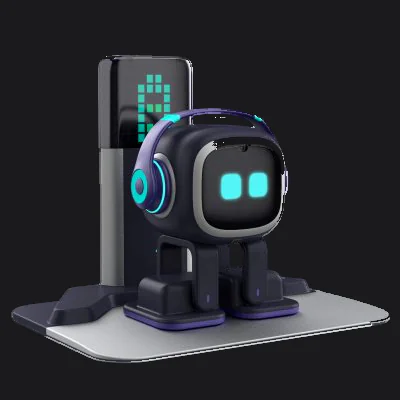 Image: Living.AI
The Home Station is the bigger upgrade than it looks. EMO finds its dock and walks home when its battery runs low, and a virtual fence, built on EMO’s own laser sensors, keeps it within a set area of your desk. It makes EMO feel far more independent, like a pet that puts itself to bed. If you buy the standard EMO first, the Home Station is also sold separately for $99.
Real-life uses: who gets the most out of it
The remote worker’s desk companion
People who work from home spend long hours at the same desk, often alone. EMO doesn’t do your work, but it adds a little life to the space: a small character that reacts when you sit down, dances when your playlist comes on, and occasionally does something silly enough to make you smile between meetings.
The gift for someone who has everything
For the friend who already owns every gadget, EMO is different. It isn’t another screen or speaker. It’s a small character with a personality. Unboxing it and watching it wake up for the first time is a memorable moment, which is exactly what a good gift should be.

The conversation starter in a shared space
In a studio, a small office or a shared workspace, EMO quickly becomes the thing people stop to look at. Visitors ask about it, colleagues give it names, and it becomes part of the room’s personality.

A first taste of everyday robotics
For curious minds of any age, EMO is an approachable way to see robotics and AI up close. Watching it map an edge, track a sound or recognise a face makes ideas like computer vision and sensors feel real rather than abstract.
Who it’s not for
EMO is charming, but it isn’t for everyone. It may not be the right fit if:
- You want a smart assistant. EMO handles simple commands, but its conversation is limited. If you want detailed answers or full home control, a smart speaker or your phone will do far more.
- Your space is noisy. Like most small devices, EMO can struggle to hear voice commands in loud rooms.
- You want all-day action. Living.AI rates its battery at up to four hours, so it spends a good part of the day charging. The Go Home package makes this much less of a hassle.
- It will face rough play. It’s a small electronic device with a screen for a face, so drops and knocks are best avoided. It’s a desk companion, not a toy to be thrown around.
- Your Wi-Fi is 5 GHz only. EMO only works on 2.4 GHz Wi-Fi. Most home routers offer both, but it’s worth checking.
- You’re uneasy about a camera on your desk. EMO uses its camera for face recognition and photos. You can delete saved photos and faces in the EMO app, but it’s worth thinking about where you place it.
Is EMO still worth it in 2026?
Here’s the honest answer: EMO is worth it if you buy it for what it does best.
It isn’t the smartest AI gadget you can buy, and it isn’t the most useful. Phones and smart speakers will always answer more questions and control more things. But that was never EMO’s job. Its job is to be a small, lively character that makes a space feel less empty and a day feel a little lighter. On that, it still delivers, and few products at its price do it as well.
If you can, choose the EMO Go Home package. Self-charging changes the experience from “a robot you look after” to “a robot that looks after itself”, which is closer to what makes EMO special in the first place.
Price and availability
On Living.AI’s official store, the standard EMO package is $279, and the EMO Go Home package is $369. A white edition of each costs $10 more ($289 and $379), and the Home Station is sold separately for $99. EMO is also sold through major online retailers in many countries, where prices vary.
Prices and features are based on Living.AI’s official store and website as of October 2026, and may change with software updates or by region.
Common questions
Does EMO need Wi-Fi?
Yes, for setup, updates and most features. It works with 2.4 GHz Wi-Fi networks, not 5 GHz-only networks.
Can EMO fall off the table?
EMO has sensors in its feet to detect edges and is designed to stop before walking off a surface. Still, it’s sensible to keep an eye on it on high or unusually shaped desks. The Go Home package’s virtual fence adds an extra boundary.
Does EMO need a subscription?
No. Living.AI sells no subscription, the EMO app is free, and software updates arrive over the internet. Extras such as the Home Station and outfits are sold separately.
How long does EMO's battery last?
Up to four hours, according to Living.AI, depending on how much it moves and plays. With the Home Station, EMO goes back to charge by itself.
Should I buy EMO or EMO Go Home?
If your budget allows, choose EMO Go Home. Self-charging and the virtual fence make EMO more independent and easier to live with. The standard EMO is the better choice if you want the lowest price, and you can add the Home Station later.
Does EMO work with an iPhone?
Yes. The EMO app is available on both iPhone and Android, and it’s used for setup, settings and games.
Sources
- Living.AI, EMO living.ai
- Living.AI, EMO (store page: package contents and specifications) living.ai
- Living.AI, EMO GO HOME living.ai
- Living.AI, Store (prices) living.ai
- Living.AI, EMO voice commands (English) living.ai
- Living.AI Forums, Firmware update 3.2.0, Go fishing with EMO! (17 July 2026) forums.living.ai